Add candidates
Candidates usually arrive by applying on your career site or through job boards. To add people yourself, upload their resumes: AI reads each one and creates the candidate.
There is no form for typing in a candidate by hand. Use the application form instead (see Fill in the application form for someone).
Upload resumes
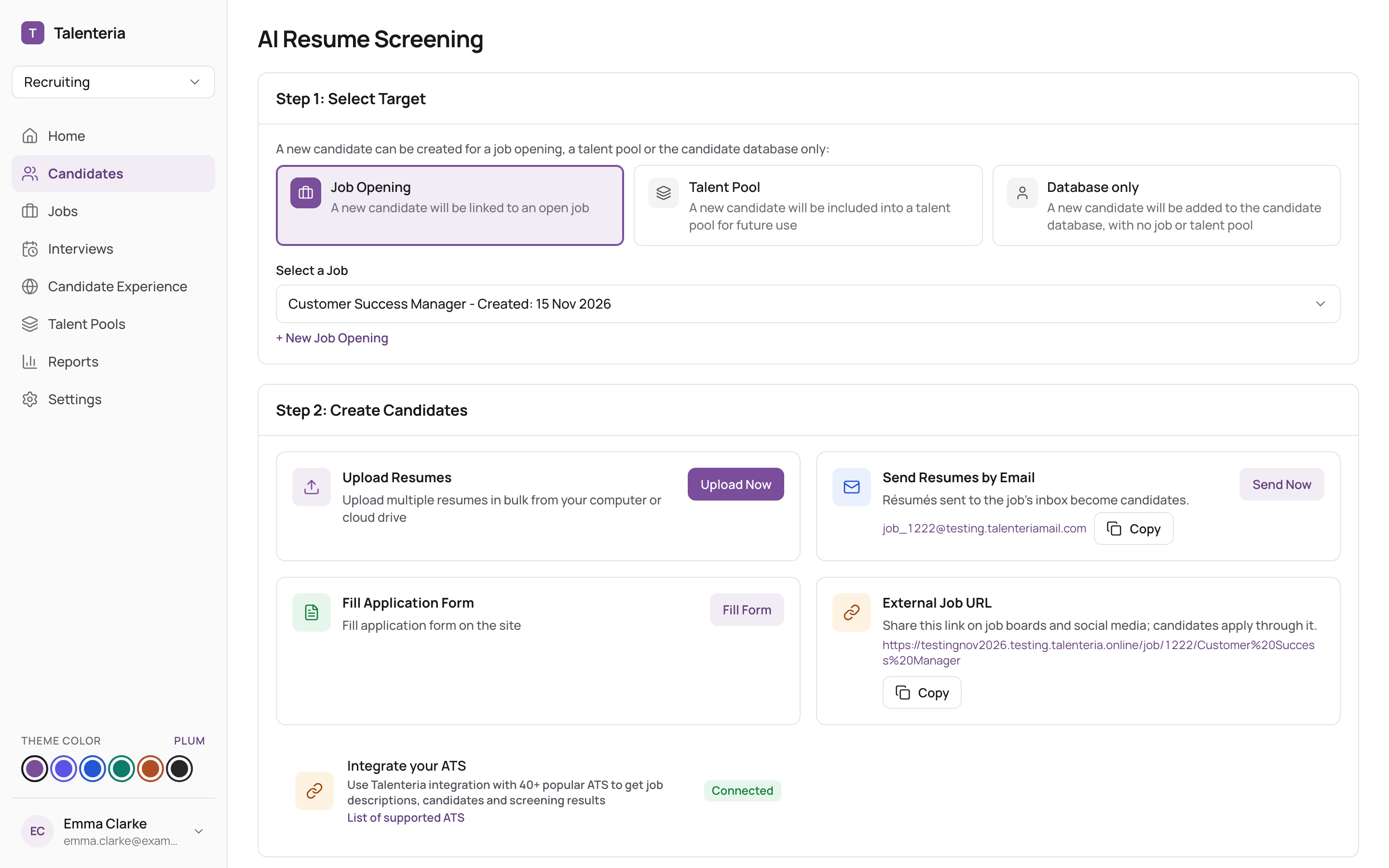
- Go to Candidates and click New Candidate (or New candidate in Quick actions on Home).
- Choose where the candidates go:
- Job Opening: pick the job under Select a Job. They become applicants of that job and get an AI match score. Click + New Job Opening to create one first.
- Talent Pool: pick the pool under Select a Talent Pool. Or tick Let AI decide the best talent pools for each candidate.
- Database only: they are added to your candidate database, with no job or talent pool.
- Under Upload Resumes, click Upload Now.
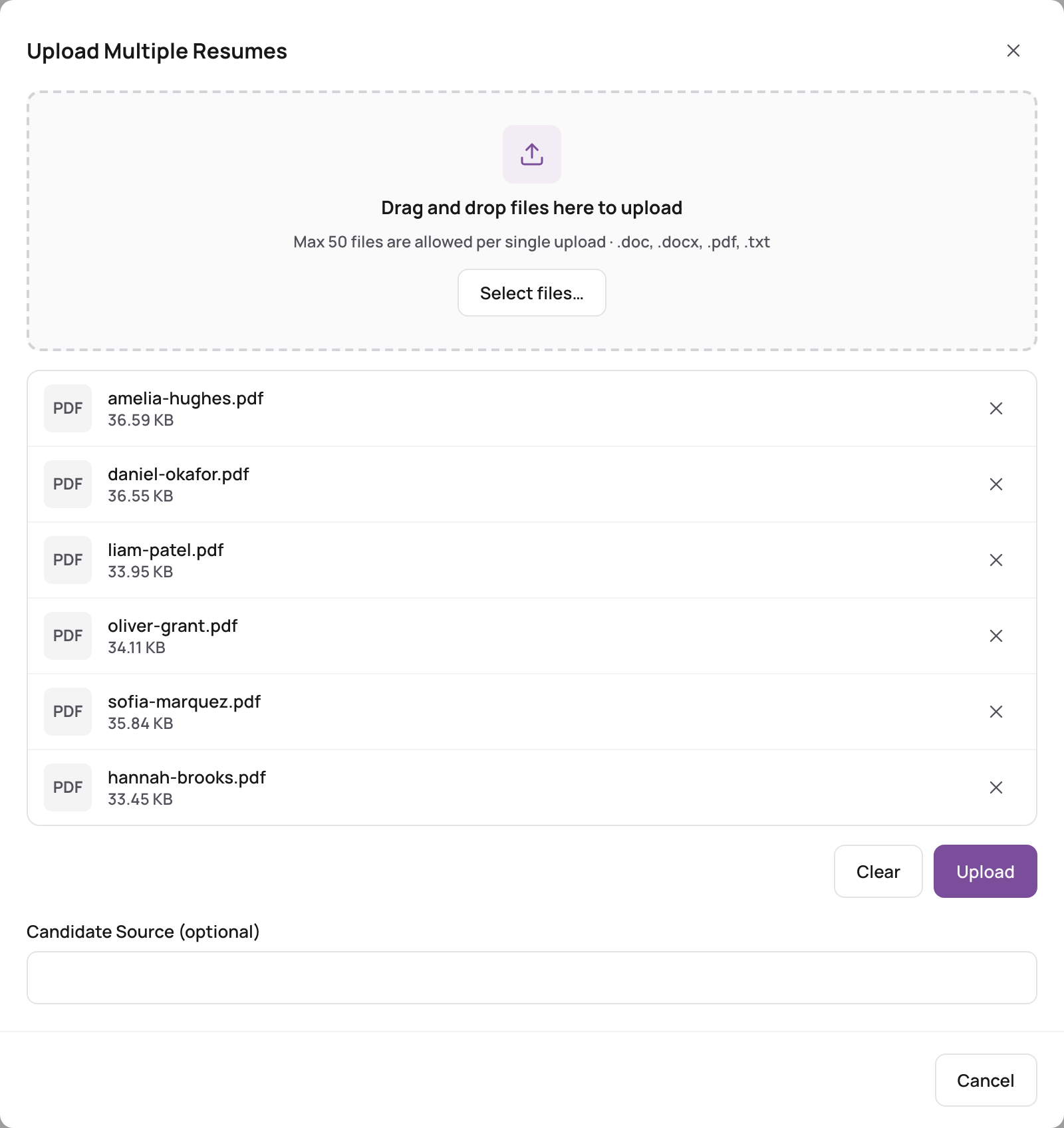
 4. Drag the files onto the window or click Select files…:
- .pdf, .doc, .docx or .txt;
- up to 8 MB per file;
- up to 50 files at a time.
- Optionally enter a Candidate Source (optional), for example the agency or event they came from.
- Click Upload. Each file shows Reading resume… while AI reads it.
When it's done, Talenteria shows how many candidates were created and how many failed, with a link to them. Click Try N failed again to retry the failed files.
You can also upload from a job: open the job and use Upload Now on the job's page, or right after you create the job.
Why a file can fail
| Message | What to do |
|---|---|
| File type not allowed | Save it as PDF, DOC, DOCX or TXT. |
| File '…' size exceeded! | Keep it under 8 MB. |
| File is empty or does not contain text | Scanned PDFs are read with OCR; if that fails, use a file with text. |
| Content of the file seems not to be a resume | Check you uploaded the right file. |
| Email … extracted from the resume is not a valid email address | Fix the email in the resume and upload it again. |
| The candidate with the email '…' is already applied for this job opening | Nothing to do: they are already an applicant. |
| Plan limit reached | Your plan's limit on candidates or monthly applications is reached. See Plans, trial and usage limits. |
If the person is already in Talenteria
Talenteria matches people by email. If a candidate with the same email exists, the resume is added to that person instead of creating a duplicate:
- their work history and education are replaced with the ones from the new resume;
- their other details are filled in only where they are empty;
- skills are added only if they have none yet. See Candidates, applications and talent pool applications.
Send resumes by email
Each job has its own inbox. Resumes sent to it become candidates of that job.
- Click New Candidate, choose Job Opening and pick the job.
- Under Send Resumes by Email, click Copy (or Send Now to open your email app).
- Send the resumes as attachments to that address.
You'll also find the address on the job's Job Ad tab as Job Application Inbox. Share it with colleagues or agencies.
Fill in the application form for someone
Use this when a candidate gives you their details in person or by phone.
- Click New Candidate and pick the job or talent pool.
- Under Fill Application Form, click Fill Form. Your career site's application form opens.
- Fill it in and submit it, as the candidate would.
Share the job's or pool's link
Under External Job URL or External Talent Pool URL, click Copy and send the link to people so they can apply themselves.